mi-align
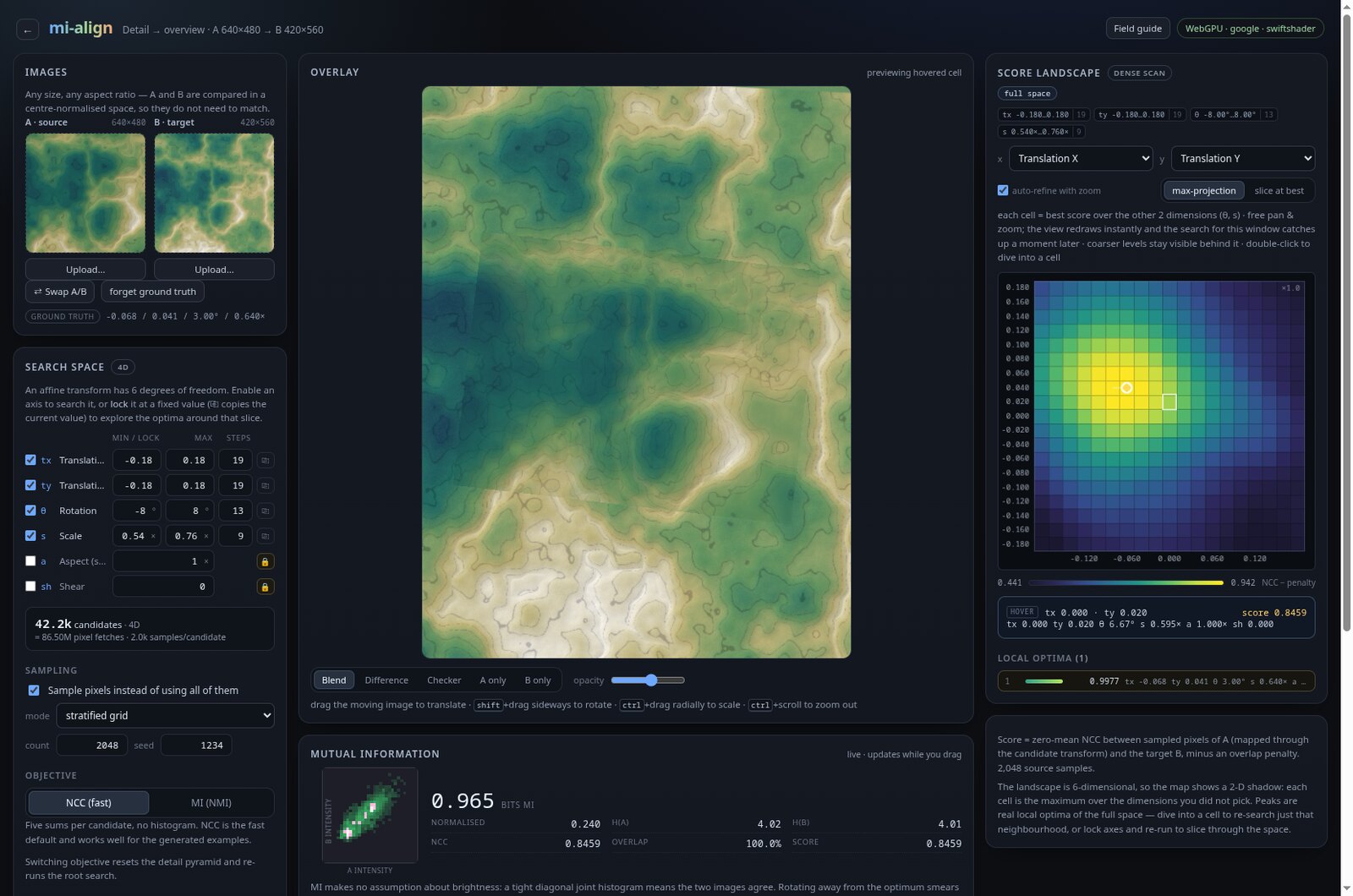
Brute-force affine image alignment in the browser: a WebGPU kernel scores tens of thousands of candidate transforms, the whole NCC/MI score landscape becomes an explorable heatmap, and mutual information is available as a live readout and an entropy-based search objective.
mi-align is an alignment studio for two images. Instead of running a local optimiser from one guess, it scores a whole grid of affine transforms on the GPU and draws the resulting similarity landscape. You can see the global optimum, the competing local optima, and the ridges between them.
What it does
- Loads two images of any size or aspect ratio, or opens one of five generated examples with an exact ground-truth transform.
- Searches a six-DOF affine space: translation, rotation, uniform scale, aspect and shear.
- Scores candidates with zero-mean NCC and an overlap penalty, or switches to a normalised mutual-information objective for multimodal pairs.
- Draws the score landscape as a 2-D max-projection over the hidden axes, with a true 2-D slice mode.
- Supports free pan and zoom over parameter space, with view-following re-searches and a detail pyramid of coarser context layers.
- Lets you hover a cell to preview its transform, dive into a cell to re-search that neighbourhood, or lock axes to slice through the space.
- Includes manual drag/rotate/scale editing, a live mutual-information readout with a joint histogram, and overlay modes for checking the alignment.
Why brute force?
The score landscape is not convex. A local optimiser can stall in a plausible basin, and for symmetric or repeated structure there may be several near-equivalent alignments. A dense scan shows all of them at once. The trade-off is cost: sampling every combination of six axes explodes quickly, which is why the app exposes per-axis step counts, axis locking and sampled pixel sets.
The default four-axis search is about 60,000 candidates. Each candidate is one workgroup of 128 GPU invocations, so the whole scan is a sequence of independent dispatches rather than a single long optimisation.
NCC and mutual information
NCC is cheaper: it needs five running sums per candidate and works well when the images share a roughly linear intensity relationship. Entropy-based MI (NMI) scoring builds a joint histogram for every candidate. It costs more, but it does not need matching features or a linear intensity mapping, so it can align images from different modalities — for example a visible-light photograph against an X-ray or XRF element map.
The MI panel reports MI in bits, normalised MI, both entropies, NCC and overlap for the transform currently on screen. The joint histogram is drawn next to it and tightens into a diagonal as the images line up.
The landscape
The field guide includes the full derivation and a set of diagrams: mi-align field guide.
A six-dimensional field is projected onto the two axes you choose by taking the maximum over the hidden axes. Peaks in that projection are real local optima of the full space. The map is a free camera: pan anywhere, zoom from 0.2× to 4096×, and let the search catch up. Coarser layers stay visible behind the refined region, and every layer shares a colour scale so the patch and its surroundings are directly comparable.
Try it
The live app is at nikhedonia.net/mi-align. It needs a WebGPU-capable browser (Chrome or Edge 113+); everything runs locally on your GPU. Open the Detail → overview example to see a scale change across different image sizes, or the Landmarks example for a landscape with many local optima.
Read the launch note: mi-align: Brute-Force Affine Alignment on the GPU.